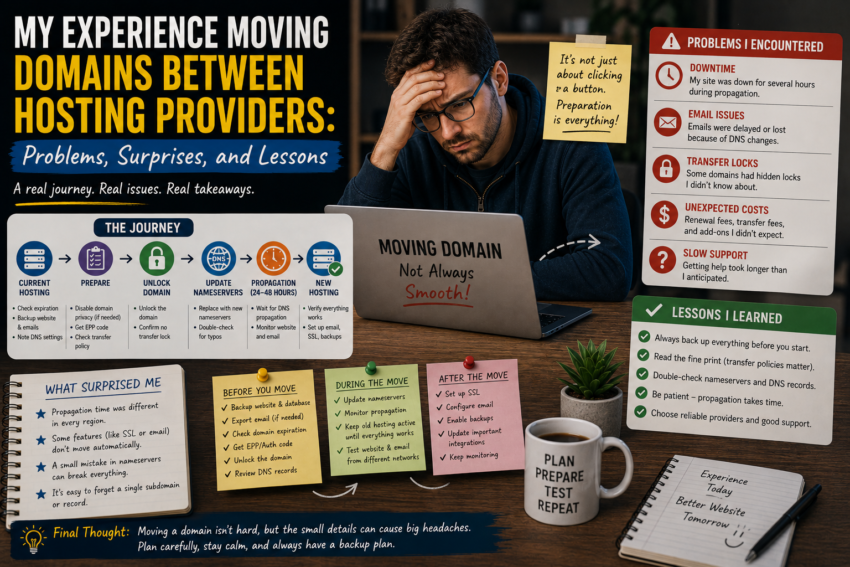
Moving a website from one hosting provider to another sounds simple when you first hear about it. I used to imagine the process as little more than copying website files, changing a few settings, and waiting for everything to work.
My experience taught me otherwise.
After managing websites and moving domains between different hosting environments, I discovered that a migration is a combination of technical preparation, careful timing, and attention to small details. Some parts went smoothly, while others produced surprises I never expected.
Here are the biggest lessons I learned from the process.
Why I Decided to Move
My reasons for changing hosting providers varied.
Sometimes I wanted better performance. Other times, the existing plan no longer matched the website’s requirements. In another situation, I was looking for a hosting environment that offered different features or better support.
The decision to move usually began with a simple question:
Is my current hosting still the right environment for this website?
I learned that changing providers should not be based on price alone. Performance, resources, reliability, support, backups, security, and scalability all deserve consideration.
I Learned That a Domain and Hosting Are Different
One of the first things I became more conscious of was the distinction between a domain and hosting.
A domain is the web address, while hosting provides the environment where the website operates.
They can be purchased from the same company, but they do not have to be.
Understanding this distinction made migrations much easier to plan.
I did not necessarily need to transfer the domain registration just because I wanted to move the website to another hosting provider.
Sometimes I only needed to move the website and update its DNS configuration.
Backups Came First
Before beginning a migration, I learned to create backups.
This sounds obvious, but it becomes especially important when making changes to live websites.
I wanted copies of website files and databases available before changing anything.
I also learned that having a backup is only useful if I know how to restore it.
For important websites, I prefer having a recovery option before beginning a major migration rather than trying to create one after something goes wrong.
The Website Was More Than Just Files
One of my first surprises was discovering how many components could be involved in a website migration.
I initially focused on website files.
Then I remembered the database.
Then SSL.
Then DNS.
Then email.
Then configuration files.
A website can depend on many interconnected components.
A migration checklist became extremely useful because it prevented me from assuming that copying files meant the entire website had been moved.
DNS Created Some Confusion
DNS was probably the most stressful part of some migrations.
When switching hosting providers, the domain needs to point toward the new environment.
Depending on the setup, this may involve changing nameservers or updating specific DNS records.
I learned that DNS changes should be planned rather than rushed.
Before making changes, I record the existing configuration.
This is particularly important when a domain is also used for email or other services.
Email Was an Unexpected Concern
One of my biggest surprises was realizing how easily email can be overlooked during a hosting migration.
If email is associated with the domain, DNS configuration can be important for keeping mail services working correctly.
During one migration, I focused so heavily on getting the website online that I nearly overlooked the email configuration.
That experience taught me to always ask:
What other services depend on this domain?
The website may not be the only thing connected to it.
SSL Certificates Need Attention
Another detail I learned to check is HTTPS.
Modern websites are expected to use secure connections, and SSL/TLS configuration can vary between hosting environments.
After moving a website, I always check whether HTTPS works correctly and whether pages, resources, and redirects behave as expected.
A website that appears to be online is not necessarily fully operational if important security or configuration details are broken.
Testing Before Switching Everything
One of the biggest improvements I made to my migration process was testing the new hosting environment before making the final DNS change.
Whenever possible, I wanted to confirm that the website loaded correctly, the database worked, forms functioned, images appeared, and important features behaved normally.
Testing reduced the pressure of the final switch.
Instead of hoping everything would work, I had already checked many of the critical components.
The Unexpected Downtime Lesson
Even with careful preparation, migrations can produce unexpected problems.
A configuration might behave differently on the new server.
A software version might not be compatible.
A DNS record might have been overlooked.
A plugin might behave differently in the new environment.
These experiences taught me that a migration should include some contingency planning.
Having a recent backup and knowing how to return to the previous environment can make unexpected problems much easier to handle.
I Started Using a Migration Checklist
After several experiences, I created a simple checklist.
It included:
- Confirming the new hosting account
- Backing up website files
- Backing up databases
- Reviewing DNS records
- Checking email requirements
- Preparing SSL
- Testing the new environment
- Updating DNS
- Checking the live website
- Monitoring for problems afterward
This checklist turned migration from a stressful event into a repeatable process.
Not Every Migration Needs to Be Rushed
Another lesson was patience.
DNS changes and server transitions can take time to behave consistently.
I learned not to assume that everything had failed simply because one device or network still showed the old result.
Instead, I checked different services and waited when appropriate.
Trying to make repeated changes too quickly can make troubleshooting more difficult.